Note
The screenshots on this page show the panel in Spanish, because they are captured once, from the Spanish interface. Your panel shows the same screens with the English labels used in this text — the buttons are in the same place.
Your VPS: ordering, resizing and deleting it
What you get: a whole machine to yourself — with its own processor, its own memory and its own disk — where you are the one in charge. It is for what a shared site cannot do: your own database, a service listening on an unusual port, or an application that needs to install things on the system.
If what you want is to publish a website with WordPress, you do not need a VPS: a site is more than enough and costs you a good deal less. See Create a website.
Order one
In the menu, . You pick the size and the operating system, and whether you pay monthly or yearly (yearly comes with 20 % off). The ten sizes, and what each one includes, are in Your plan: what it includes, how you pay and how to change it.
The machine takes a few minutes to be ready. Meanwhile you will see it in with its status.
Note
The IP address. Every VPS requires a mandatory dedicated public IPv4 address, billed as a separate recurring item: €6 per month or €72 per year. Point your domain to it and it works, including for email and services that do not use the web. If you need a second address, order another add-on under at the same unit price.
View and manage it
In you have the list, with the IP address, the processor, the memory and the status of each one. The filters at the top — All, Active, Stopped — let you narrow it down to the ones you care about.
From the Action column on each row you start it, stop it or restart it.
Change the name
Open the VPS page and, under VPS name, enter a name of up to 63 letters, numbers or hyphens. The name in the panel and infrastructure changes immediately: the machine is not stopped or restarted.
The name shown in the panel and the hostname known by the operating system are separate values. If it is Linux, is running and its agent responds, you can select Also change the hostname inside Linux: the change is applied and verified live. Terminals that were already open may keep the previous prompt until you log in again.
If the agent does not respond, the panel keeps the new name and tells you; it causes no interruption. You can also change it from Linux with sudo hostnamectl set-hostname new-name. Windows needs a restart to apply its internal name, so the panel never does that automatically. Change it inside Windows and restart whenever it suits you.
Only the account administrator can change the name seen by the whole team.
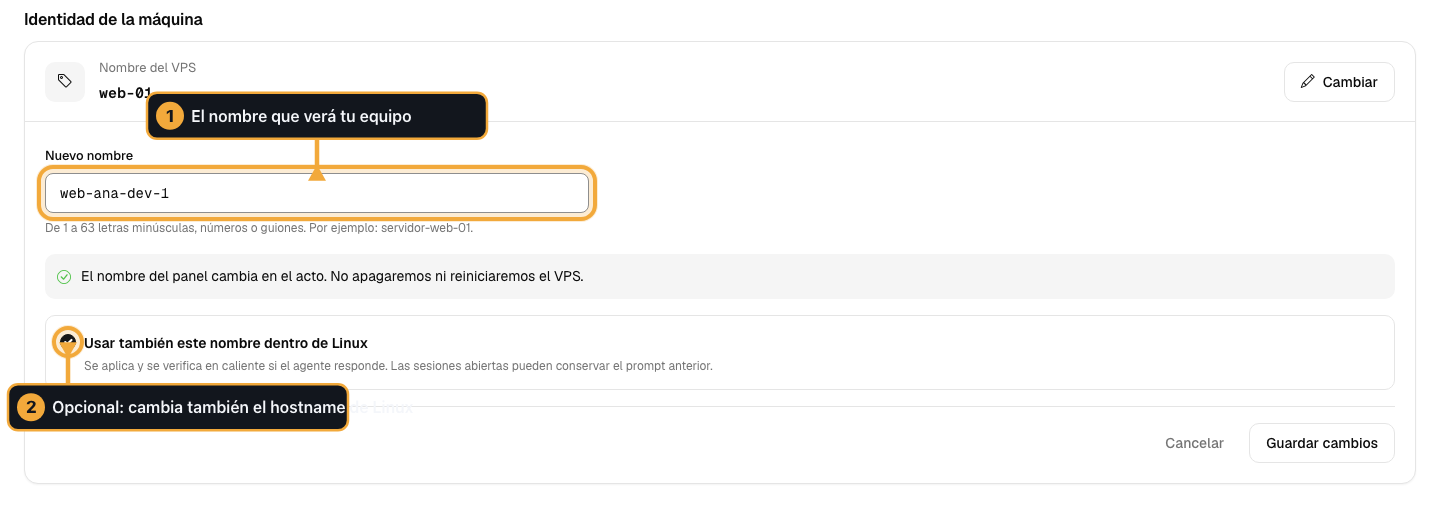
Enter the name your team will see. The second option is optional and also changes the hostname inside Linux without restarting.
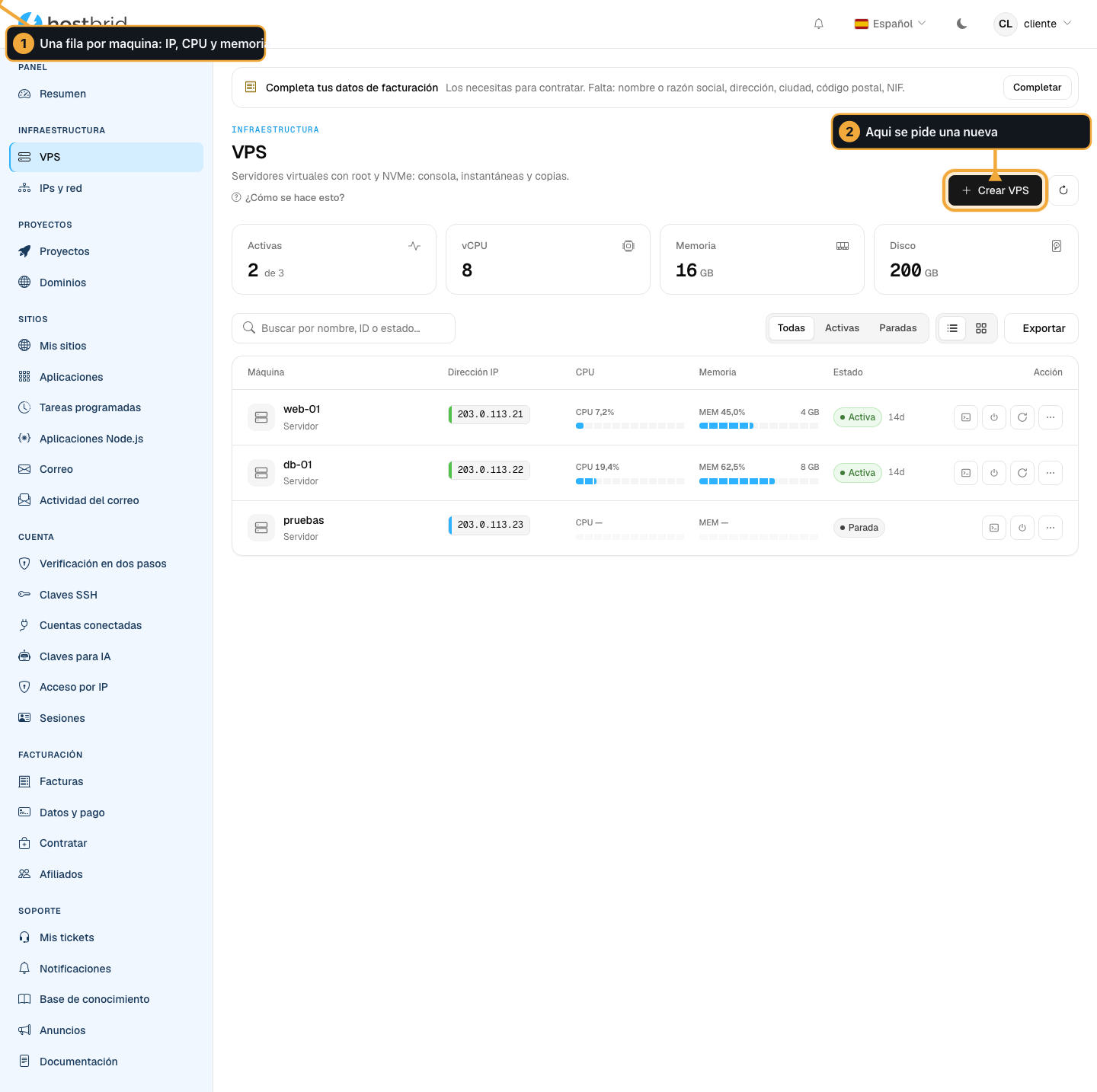
Each row is a machine. From the right you start it, stop it and restart it.
Warning
Stopping a VPS brings down everything it serves: websites, databases, email. Nothing is lost — the disk is still there and everything comes back when you start it — but while it is stopped it does not respond.
Restarting does not fix a service that has crashed inside the machine. If what is failing is your application, restarting the whole machine wipes the logs that would explain the failure. Log in over SSH and read them first.
Log in over SSH
Upload your public key in before creating the machine: it gets installed on its own at boot.
If you had already created it, upload the key anyway and restart the machine.
ssh root@<la IP de tu VPS>
Note
The SSH port of your VPS is whichever one you decide inside the machine. Port 22022 that appears in other guides is the one for our servers, not yours.
Upgrade the machine
A machine can be upgraded in four things: processor, memory, primary disk (the system one) and an additional disk for backups, photos or archiving.
What you upgrade belongs to that machine. It is not shared with your other servers, and it does not move to another one if you delete this one: if you have two small machines, they cannot be merged into a big one. For that, you move one up a plan and cancel the other.
Within what your plan includes, you adjust it yourself, at no cost, on the machine’s page, under CPU and memory. That is what you do, for example, after moving up a plan.
Por encima de lo que incluye tu plan, lo pagas desde la misma ficha: te enseñamos el precio antes de cobrar, es el de la calculadora de hostbrid.com/vps, se cobra hoy la parte que queda del periodo y va en la misma cuota que la máquina (al año, con su 20 % de descuento). Sólo quien administra la cuenta puede contratarlo. Paso a paso: Expand your VPS: more CPU, more memory, more disk.
The made-to-measure machine
The ten sizes are a starting point, not a ceiling: yours can be taken to any configuration, adding processor, memory or disk piece by piece. You don’t have to fit into a size.
The price of that configuration is the same one the calculator at hostbrid.com/vps gives you, under “Configure the machine piece by piece”: the panel uses that formula and no other. If you want to know what it will cost you before ordering it, work it out there.
The additional disk is charged separately, at 0,022 € per GB per month.
When each change takes effect:
Processor and memory are applied on restart. Restart it whenever a break suits you.
The primary disk grows on the spot, but it cannot be made smaller afterwards, not even if you stop needing it. So before growing it, think about whether an additional disk is enough, since that one can be removed.
Remove an upgrade
If you no longer need what you upgraded above your plan, you can cancel it:
It stops being charged right away. Your bill goes down from the next charge.
What you have already paid is not refunded, so you keep it until the end of the paid period. That day it is removed.
Until that date you can undo it at no cost.
Removing processor or memory from a running machine means powering it off and on again. We do it from 03:00 to 05:00 (Madrid time) on the day the period ends. We tell you when you cancel, and if you would rather take it down yourself at another time, you can restart it beforehand whenever suits you best.
Two different cases:
The primary disk cannot be removed, because it cannot be made smaller. If you want to pay less for it, the way out is to create a new, smaller machine, move your data there and cancel the old one. Write to us and we will help you.
An additional disk stops being charged by deleting it, and its data is lost. So that it is not done by accident, you have to type its name. If you have a snapshot that includes it, delete the snapshot first. It stops being charged right away, with no refund.
Delete the machine
Deleting the machine does not cancel the plan. You still have the server subscribed, and you can create another machine in its place with what you have subscribed. If what you want is to stop paying, you also have to cancel it: see Cancel a plan.
Warning
Deleting the machine deletes everything inside it, including its additional disks, and it cannot be recovered. Take out anything you want to keep first.
Deleting the machine, cancelling upgrades, deleting an additional disk and cancelling the plan can only be done by whoever administers the account, which is whoever pays. If there are several of you, ask that person to do it. Changing plan can be done by anyone on the team.
Install an application
In there is a catalogue. The ones that can be installed on a VPS say so on their page, and they install themselves, already published with their certificate.
Automate it
Everything above can be done without opening the panel:
hostbrid maquinas list          # ver las tuyas
hostbrid maquinas start 101     # arrancarla
hostbrid maquinas stop 101      # pararla (te pide escribir su nombre)
The number is the machine identifier: it comes out in the first command.
You can also ask your AI to do it, if you have connected the MCP to it. For that, the key needs the maquinas:leer permission, which you tick yourself when you create it in . The one for starting and stopping, maquinas:encender, does have to be requested in a ticket. See The API, for automating your account.
Common problems
- I created it and it won’t start
Give it a few minutes: the first time it has to copy the system image. If it goes past ten, open a ticket with us giving the machine name.
- It won’t let me log in over SSH
Nearly always the key was uploaded after the machine was created. Upload it in and restart.
- I want more memory
Si tu plan la incluye, ajústala en CPU y memoria, en la ficha de la máquina, y reiníciala. Si no, amplíala pagando la diferencia desde la misma ficha (Expand your VPS: more CPU, more memory, more disk) o sube de plan (Your plan: what it includes, how you pay and how to change it).
- I have grown the disk and now I want to shrink it
You cannot. The way out is a new, smaller machine: write to us and we will help you move the data.