Note
The screenshots on this page show the panel in Spanish, because they are captured once, from the Spanish interface. Your panel shows the same screens with the English labels used in this text — the buttons are in the same place.
Email on your domain without moving your DNS
What you get: a mailbox on your domain (25, 100 or 250 GB) even if your DNS is at Cloudflare, at your registrar or anywhere else. You do not have to transfer the domain or change the nameservers, and your website stays where it is.
Before you start
You need an account in the panel (
my.hostbrid.com). Email is ordered from there: the public website sends you to the panel, because that is where you see the record you have to add.You need to be able to add records to your domain’s DNS, wherever you manage it.
We have to check that the domain is yours before we charge you. Any one of these three things will do, whichever is easiest for you:
You bought or transferred it with us: you do not have to do anything.
It uses our DNS (
ns1.hostbrid.comandns2.hostbrid.com) and the zone is in your account: you do not have to do anything.Its DNS is elsewhere: you add one TXT record. That is what this guide explains.
Steps
In the panel, open Order now, Add-ons tab, and click Order now on the email plan you want: Correo 25 GB, Correo 100 GB or Correo 250 GB.
In Your email domain, type your domain, for example
mitienda.example, and click Go to payment.If your domain’s DNS is elsewhere, nothing is charged yet: the record you have to add appears below the domain, with a button to copy each part.
Type:
TXTName:
_noxpanel-verify.mitienda.exampleValue:
noxpanel-verify=followed by a code unique to your account. It is the same for all your domains.
If we recognize your provider, it also tells you where its panel is and gives you the name the way it asks for it (in Cloudflare, just
_noxpanel-verify).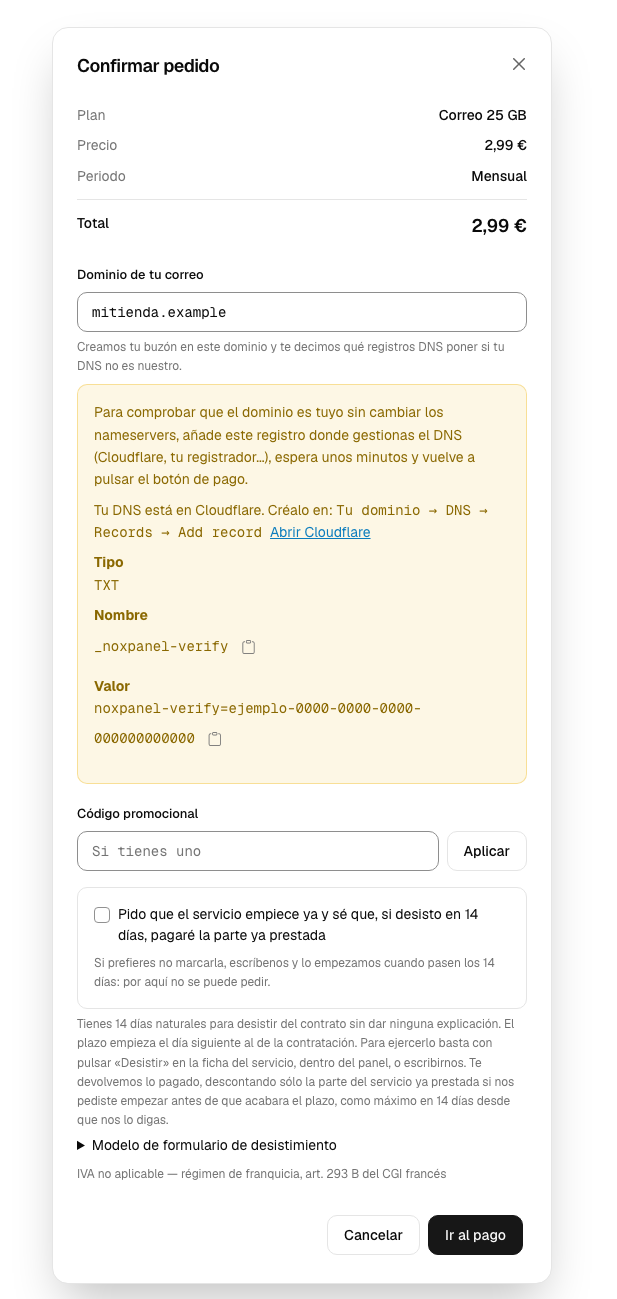
Add that record where you manage your DNS. In Cloudflare: your domain → DNS → Records → Add record, type TXT, in Name just
_noxpanel-verify(Cloudflare adds the domain itself), in Content the whole value, and save.Wait a few minutes and click Go to payment again. We check it by asking your domain’s DNS servers directly, so as soon as your provider publishes it, it counts.
Pay. We create the
info@mailbox on your domain and send you an email with:a link to set your password (we never send you one by email),
the records you have to add to your DNS so that email arrives and does not end up in spam.
We send them written the way your provider asks for them, and you also have them on the Email page with their status (see Your DNS at another provider: what to add and how to write it there). They are these, except the DKIM signature, which is created for your domain when the mailbox is set up:
Type
Name
Value
MX
@mail.hostbrid.com(priority 10)TXT
@v=spf1 mx a:mail.hostbrid.com ip4:185.140.33.13 ~allTXT
default._domainkeythe DKIM key from the welcome email
TXT
_dmarcv=DMARC1; p=none; rua=mailto:postmaster@tudominioSet up your email program: username, the full address; incoming IMAP on
mail.hostbrid.com, port 993 with SSL/TLS; outgoing SMTP onmail.hostbrid.com, port 587 with STARTTLS.
Warning
A domain can only have one SPF record. If you already have a TXT on @ that starts with v=spf1, do not add another: they have to be merged into one. With two, the servers that receive your email treat the SPF as broken.
Let email apps set themselves up
Besides the four email records, the panel offers you, as optional, those for autoconfiguration (autoconfig, autodiscover and the SRV records _imaps._tcp, _submission._tcp and _submissions._tcp). Without them you will have to type the server by hand in the email app. And if the domain already has an MX of another server or two SPF records, the panel tells you which to delete and gives you the SPF already merged. It is all explained in Your DNS at another provider: what to add and how to write it there.
Common problems
- It asks me to change the nameservers to order email
You no longer have to. Order email from the panel (Order now → Add-ons): if your DNS is elsewhere, it shows you a TXT record to prove the domain is yours. The public website does not show it because it does not know who you are; log in to the panel.
- It cannot find the TXT record I added
Check the name: it has to end up as
_noxpanel-verify.tudominio. Many panels, like Cloudflare, add the domain themselves; if you paste the full name it ends up repeated (_noxpanel-verify.tudominio.tudominio). And the value goes in whole, with nothing before or after it. To check it:dig TXT _noxpanel-verify.tudominio @ns-de-tu-proveedor.- It says it could not be checked and to try again later
Your domain’s DNS servers did not answer in time. You have not been charged anything: try again in a few minutes. If it stays the same, open a ticket.
- My website is with you and my DNS is at Cloudflare
That works too: add the TXT at Cloudflare, not in our panel. If you add it to the zone in our panel it does not count as proof, because then we would be the ones publishing it.
- My DNS is served by my own server or by one of your VPSs
If your domain’s DNS servers are on private addresses or on our own networks, the TXT does not count as proof. Open a ticket.
- I want email on a subdomain
Like
tienda.mitienda.example: that works too. The TXT goes in themitienda.examplezone with the name_noxpanel-verify.tienda(the panel already gives it to you that way).- I have Cloudflare Email Routing turned on
Turn it off for that domain. It adds its own
MXrecords, and part of your email would end up at Cloudflare instead of in your mailbox.- Can I delete the TXT record afterwards?
Yes, once the mailbox has been created. Leaving it there does no harm either.