Note
The screenshots on this page show the panel in Spanish, because they are captured once, from the Spanish interface. Your panel shows the same screens with the English labels used in this text — the buttons are in the same place.
Your plan: what it includes, how you pay and how to change it
What you get: knowing what you have subscribed to and how much you have used, choosing between paying monthly or yearly, and upgrading or downgrading your plan knowing in advance what you will pay.
How much you have used
In you have your plan’s counters: websites, databases, mailboxes and disk.
Limits are not a warning: once you hit one, you cannot create anything else. If you try to create a site with the plan full, the panel tells you and does not half-create it.
The plans
Website plans (Sites). Monthly prices, paying month by month:
Plan |
Sites |
Disk |
Databases |
Backups |
Support |
Price |
|---|---|---|---|---|---|---|
Dev |
3 (with a |
1 GB |
3 |
— |
Community |
Free |
Starter |
3 |
5 GB |
3 |
Weekly |
By email |
2,99 €/month |
Pro |
10 |
20 GB |
10 |
Daily |
By email |
6,99 €/month |
Agency |
30 |
50 GB |
30 |
Daily |
Priority |
14,99 €/month |
Server plans (VPS). Each size is a machine with its own processor, memory and disk, shared with nobody:
Size |
Processor |
Memory |
Disk |
Bandwidth |
Price |
|---|---|---|---|---|---|
gp.nano |
1 core |
2 GB |
40 GB |
3 TB |
5 €/month |
gp.micro |
2 cores |
4 GB |
80 GB |
5 TB |
9 €/month |
gp.starter |
4 cores |
8 GB |
100 GB |
10 TB |
16 €/month |
gp.small |
8 cores |
16 GB |
200 GB |
20 TB |
29 €/month |
gp.medium |
12 cores |
32 GB |
300 GB |
40 TB |
54 €/month |
gp.pro |
16 cores |
48 GB |
350 GB |
60 TB |
77 €/month |
gp.large |
24 cores |
64 GB |
400 GB |
80 TB |
98 €/month |
gp.xlarge |
32 cores |
96 GB |
500 GB |
120 TB |
124 €/month |
gp.xxlarge |
40 cores |
128 GB |
800 GB |
160 TB |
153 €/month |
gp.xxxlarge |
48 cores |
192 GB |
1 TB |
200 TB |
205 €/month |
The up-to-date table is always at hostbrid.com/pricing. What you can add to a server —more processor, memory or disk— is in Your VPS: ordering, resizing and deleting it.
The price you see is the price you pay: no tax is added on top. Further down, under Your invoices, is why.
Paying monthly or yearly
Every plan can be paid for in two ways:
Monthly. You are charged every month, on the same day you ordered it.
Yearly, with a 20 % discount. You pay the twelve months in one go, up front. For example, a 5 €/month plan comes to 48 € a year instead of 60 €.
You choose when you order. If you want to move a plan you already have from monthly to yearly, or the other way round, write to us from : it cannot be done from the panel yet.
Change plan
In , in the subscriptions table, click Change plan on the plan’s row. You see the plans you can move to, what each one includes and a tag saying whether for you it is an upgrade or a downgrade.
You can only switch between plans in the same family (website to website, server to server) and with the same payment frequency.
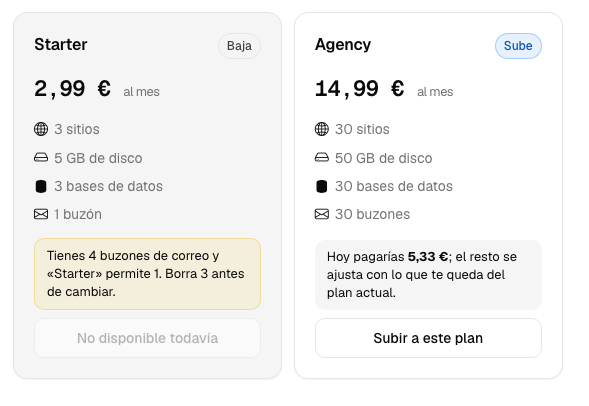
On the left, a plan you cannot downgrade to yet: it says what is over the limit. On the right, one to upgrade to, with what you pay today.
Upgrading
You are charged straight away, and only for the part of the period that is left. If you have twenty days left of a month, today you pay the difference between the two plans for those twenty days; at the next renewal you pay the full new plan. On a yearly plan it works the same way with the months left in the year.
Before you confirm, the screen shows you Today you would pay with that figure. You get the new plan as soon as the payment goes through.
Note
On a server, upgrading the plan does not change the machine by itself. It gives you more processor, memory and disk to use. Then go to your server and adjust them under CPU and memory: processor and memory changes take effect when you restart it. Your VPS: ordering, resizing and deleting it explains how.
Downgrading
Nothing you have already paid is refunded. You keep the plan you had until the end of the period you paid for, and from the next renewal you pay for the cheaper plan.
What stops you downgrading:
On website plans, having more sites, databases, domains or mailboxes than fit in the plan below. The screen says what is over the limit and how many you have to delete, for example You have 4 mailboxes and “Starter” allows 1. Delete 3 before switching. The plan shows as Not available yet until it fits. Nobody deletes anything for you.
On servers, the machine using more processor, memory or disk than the size below includes. Shrink the machine first and try again. The primary disk cannot be made smaller: if it is already bigger than the one in the size below, the way out is to create a new, smaller machine, move your data there and cancel the old one. Write to us and we will help you.
If the downgrade would not make you pay less, it is not applied: the panel tells you instead of changing your plan for nothing.
Cancelling
It has a guide of its own, because it is worth reading in full first: Cancel a plan. It also covers the 14-day withdrawal right and what happens if a payment does not arrive.
Your invoices
They are in , and your tax details —the ones that appear on them— in .
Important
Tax details are not optional: without them you cannot order anything. We need your name or company name, the address, the city, the postcode and the tax ID. If any are missing, the panel tells you with a warning at the top and takes you to fill them in; you can still look around your account, but you cannot buy until they are there. Fill them in before you go and order, and you save yourself being cut off halfway through.
The reason is a boring one and there is no way around it: an invoice without correct tax identification is not a valid invoice.
Who invoices you. Invoices are issued by enginerIT, the French company behind Hostbrid (Frontignan, France; intra-EU VAT number FR31924485634). All its details are in the legal notice on the site.
Why they carry no VAT. Every invoice carries the note “TVA non applicable, art. 293 B du CGI”. It means VAT not applicable: small-business exemption under article 293 B of the French General Tax Code. It is a scheme for small French companies that do not charge VAT, and that is why the price on the site is the final price.
Automating it
hostbrid api GET packages/     # los planes
hostbrid api GET tenants/      # el tuyo
An AI with the MCP can look up your plan and prepare a change, but it does not pay for it: you confirm that yourself.
Common problems
- It will not let me downgrade
You have more than fits. The message says what. Reduce it and try again.
- I downgraded and got nothing back
That is normal: downgrading does not refund what you have already paid. You keep the previous plan until the end of the period and pay less from the renewal onwards.
- I changed plan and the counter is the same
Reload the screen. If it is still the same, the payment may still be going through: check it in .
- I do not know which plan I need
Write to us from telling us what you are going to put on it: how many sites, whether they have a store, how much email. We will tell you which one covers it.