Note
The screenshots on this page show the panel in Spanish, because they are captured once, from the Spanish interface. Your panel shows the same screens with the English labels used in this text — the buttons are in the same place.
Cancel a plan
What you get: stop paying for a plan without losing what you have already paid for. At the end you will also find the withdrawal right for the first 14 days, and what happens if a payment does not go through.
How cancelling works
Nothing is cut off straight away. When you ask to cancel, two things happen:
You are not charged again.
Your service keeps running until the end of the period you have already paid for —the month, or the year if you pay yearly—.
What you paid is not refunded, because you keep the service until that date. Not a day less: it is yours.
When that date arrives, the service is switched off: sites, email and machines. For 7 days we keep a backup, which you can ask us for from . After those 7 days everything is deleted and it can no longer be recovered.
Warning
Download anything you want to keep before that date. Do not rely on the 7-day backup as a plan: it is a last resort.
Before you cancel
Check whether what you need is something else:
Just want to pay less? Use Change plan, in the same row. Moving to a smaller plan keeps your service running. See Your plan: what it includes, how you pay and how to change it.
Do you have one service you no longer need but want to keep the rest? Cancel just that subscription, not all of them.
Is there an upgrade on a server you no longer need? That is cancelled separately, without cancelling the server: see Your VPS: ordering, resizing and deleting it.
And take your things with you:
Files — from the site’s Files button, or over FTP.
Database — export it from phpMyAdmin.
Email — download it with your email program before that date.
Servers — copy out whatever you keep inside the machine.
Steps
Go to in the sidebar.
Find the plan in the table of active subscriptions.

Click Cancel.
In the Cancel the subscription window, read what it says and, if you like, write a Reason. It is optional, and it helps us improve.
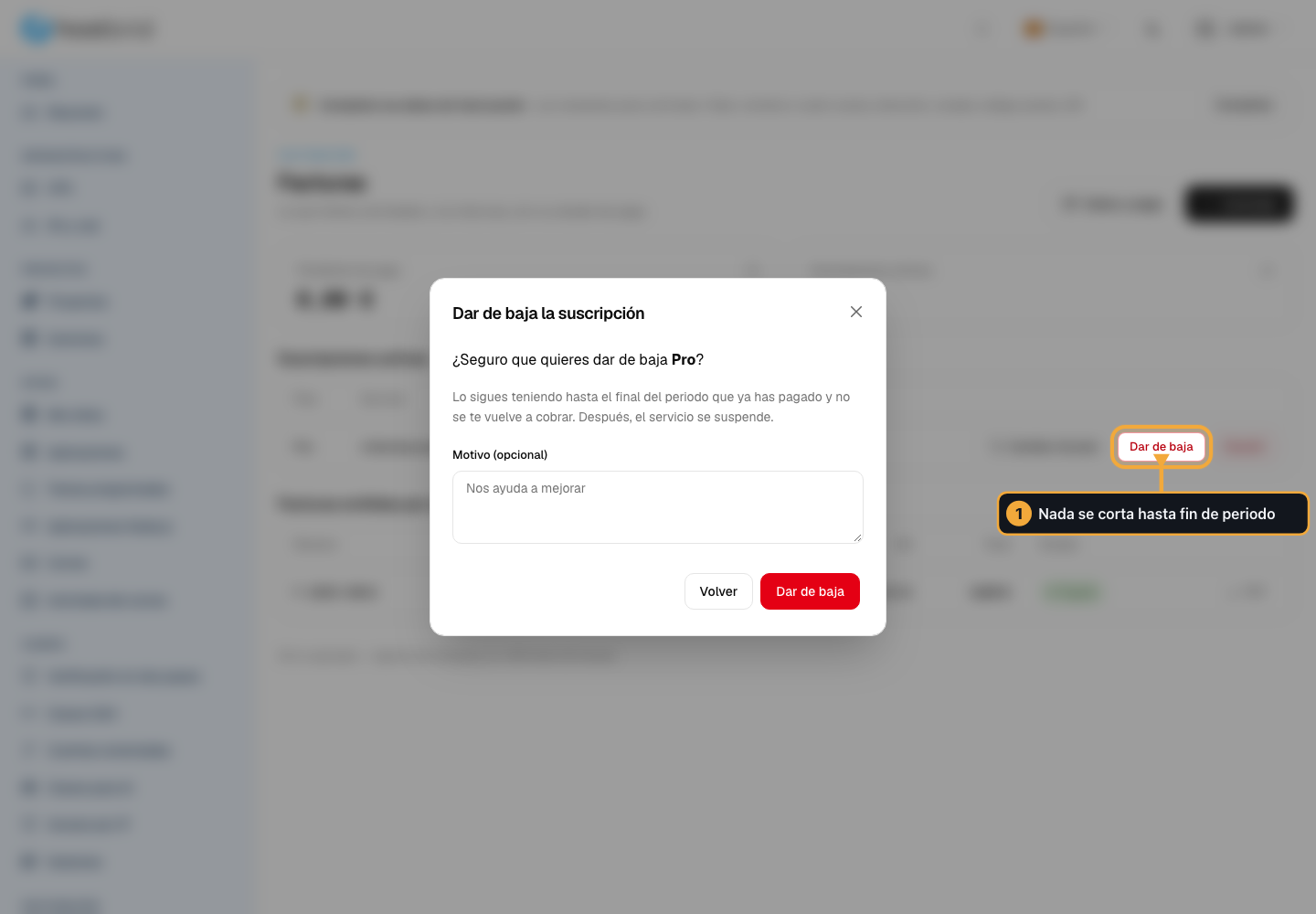
Click Cancel in the window. The other button, Back, closes it without doing anything.
Only the person who manages the account can cancel, and that is the person who pays.
How you know it worked
The cancellation is recorded straight away and you are not charged again. Here is how to check:
No new charge appears in the following period. That is the definitive sign.
Your service keeps running until the end date of the period. That is correct, not an error.
The panel tells you straight away, in green and with the date up to which you keep the service.
Other messages you may see
- “This subscription was already cancelled”
You had already cancelled it. There is nothing else to do.
- “You do not have permission to cancel this subscription”
Only the person who manages the account can cancel. If there are several of you, ask that person to do it.
Changing your mind
If you change your mind before that date arrives, write to us from . While the service is still active we can turn it back on without losing anything.
Once that date has passed, only the 7-day backup is left: write to us as soon as you can.
Withdrawing within the first 14 days
If you sign up as a private individual, you have 14 calendar days from the moment you order (a plan or an upgrade) to pull out without giving a reason.
When you order, you ask us to start the service right away so you can use it from the first minute. That is why, if you withdraw, we refund what you paid minus the part you have already used, counted by days. If you withdraw on day 4 of a 30-day month, you get 26 of the 30 back. The money goes back to your card within 14 days at most.
To withdraw, click Withdraw on the service’s row, in . The button only shows during those 14 days and only if you signed up as a private individual: once the deadline passes it disappears on its own. Before you confirm, you will see in writing how much you get back.
Warning
Withdrawing is not the same as cancelling. Cancelling leaves you the service until the end of the period you already paid for. Withdrawing undoes the contract and cuts the service off right away, in exchange for refunding what you have not used. If what you want is to use up what you paid for, cancel instead.
Note
If you sign up as a business or a freelancer —with your tax ID, ticking that you are ordering as a company or professional— there is no right of withdrawal: it is a consumer right. You can cancel whenever you like, like any other customer, but what you paid is not refunded.
If a payment does not go through
If a renewal charge fails —expired card, no funds, the bank rejects it— this is what happens, counting from the day of the charge:
Day |
What happens |
|---|---|
0, 3 and 7 |
We email you and try the charge again. Everything keeps running. |
8 |
Suspension. Your sites, your email and your machines are switched off, but nothing is deleted. As soon as you pay, everything comes back. |
30 |
Cancellation. The service is cancelled. |
30 to 37 |
We keep a backup for 7 days, which you can ask us for. After that everything is deleted and cannot be recovered. |
To avoid this, keep your card up to date in . If you can see a payment problem coming, write to us before day 8: it is much easier to sort out with the service still on.
Frequent problems
- I have paid and my service is still turned off
The charge and the ignition are not instantaneous: give it a few minutes. As soon as the payment is received, it will turn on again on its own. If it still doesn’t work after half an hour, write to us with the payment details.
- I turn on my server and it turns off again by itself
As long as the payment is pending, we will turn it off again. It is not a machine failure: fix the payment and it will stop happening.
- I have not received any notification that it had not been charged
We notify by email on the same day, at 3 and 7. Check the spam folder and review your preferences in Notifications. They always appear on the bell in the panel, even if the email fails.
- My service was cancelled and I want to recover my data
We keep a copy for 7 days from the cancellation. Within that period, write to us today. After that, there is nothing to recover.
- I want to cancel my subscription and get my money back
If less than 14 days have passed since you contracted and you are a private individual, yours is not a cancellation but a withdrawal, and that one does return. Look at Withdraw within 14 days, or cancel your service.
- I cancelled the service and can still use it
It’s correct: you have paid it until the end of the period and you use it until then. From that date it is suspended.
- My card expired and I don’t know how to change it
In Invoicing, “Data and payment”, Card section. Save the new one and the next attempt at billing is already included with it.
- I want to pause the service for a couple of months instead of canceling it
There is no pause option: you cancel and order the service again. Export the files and database first, because the backup is kept for only 7 days.