Note
The screenshots on this page show the panel in Spanish, because they are captured once, from the Spanish interface. Your panel shows the same screens with the English labels used in this text — the buttons are in the same place.
Buy a domain, renew it or transfer it in
What you get: your website’s name, in your name. Buy it here, or transfer in the one you already have somewhere else.
If what you want is to point a domain you already own at your site, without moving it, that’s a different guide: Point your domain here.
Buy one
In the menu, . The search box is at the top:
Search for the domain you want. If it’s free, we register it and leave it pointing to your site.
You can type the whole domain (mitienda.com) or just one word (mitienda) and we try it across a whole extension group at once. The Only available ones checkbox hides the ones already taken.
The price you see is for the first year. Renewal may cost something different —with some extensions, quite a bit more—: the renewal price is shown on each domain’s details before you pay.
Renew it
On that same screen, each of your domains has:
Renew automatically — leave it on. It’s what keeps you from losing the domain through an oversight.
Renew — to do it early by hand.
Warning
An expired domain is not recovered by paying late. It goes through a grace period where it can still be rescued, usually with a surcharge, and after that it goes back on the market and anyone can take it. Automatic renewal costs the same and carries none of that risk.
Transfer it in from another registrar
On that same screen, the Already have a domain elsewhere? block:
Ask your current registrar for the authorization code (EPP).
Check that the domain is not blocked for transfers.
Paste it here and click Transfer.
It takes from a few hours to a week, depending on the extension. Your site and your email keep working in the meantime: the transfer changes who bills you for the domain, not where it points.
Note
Transferring a domain in usually adds a year to what you had left, and is charged as a renewal.
Take it elsewhere
It’s yours, so it can leave whenever you want. On the domain’s details, Code to take it elsewhere gives you the EPP to hand to your new registrar. No ticket to open and nothing to wait for.
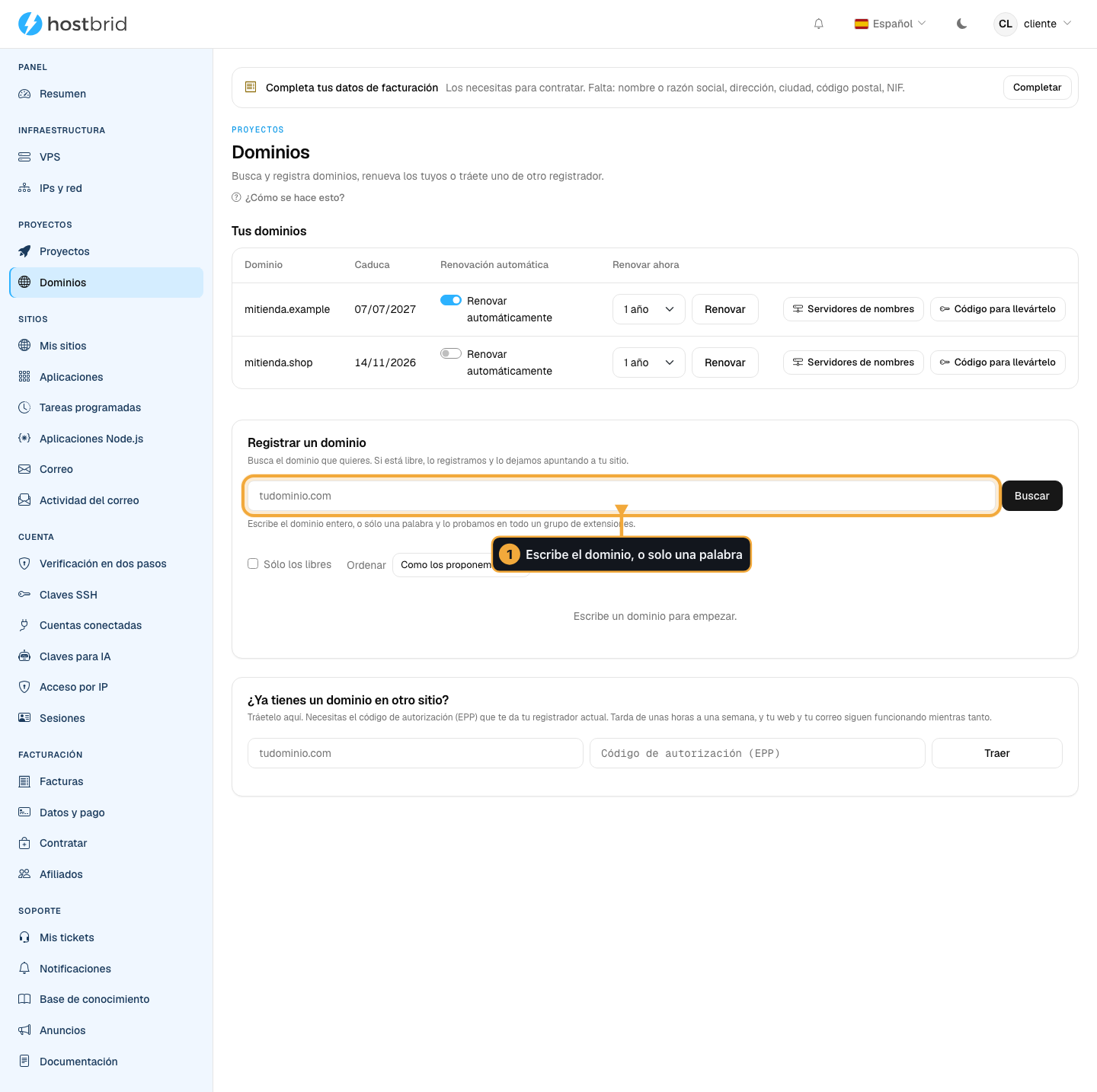
The search box at the top; below it, the domains you already have.

The automatic renewal checkbox is what keeps you from losing the domain through an oversight.
Automate it
You can ask an AI to search and price domains through the MCP. Not to buy: anything that spends money is confirmed by a person in their panel. The AI leaves the order ready and gives you the link to pay for it yourself.
Common problems
- It says the domain is free, and then at payment, that it is not
Someone registered it in the minute in between. It happens. Nothing is charged.
- The transfer has been stuck for days
Almost always the origin registrar has not released the domain, or the block is still on. Check it in their panel; if everything looks fine, open a ticket with us and include the domain.
- I bought the domain and my site does not show up
The domain exists but it does not point anywhere yet. Follow Point your domain here.